
Setup and Purchasing
Introduction
In this section, we'll walk you through the entire process of purchasing a Bitcoin mining rig (ASIC) on the Blockware Marketplace and setting up your account. You'll learn exactly what you're buying, how the hosting contract works, and the steps needed to get started with your mining operation. We'll also cover important details about managing your account, setting up a Bitcoin wallet, and understanding the payment process. Whether you're new to mining or just new to the Blockware Marketplace, this guide will help you navigate the setup and purchasing process with confidence.
What am I buying through the Marketplace?
A Mining Rig (ASIC) from the Seller
When you purchase an ASIC, you're acquiring a highly specialized computer designed specifically to mine Bitcoin with maximum efficiency (learn more about bitcoin miners). These machines, known as Application-Specific Integrated Circuits (ASICs), are purpose-built to perform the complex calculations required for Bitcoin mining, far surpassing the capabilities of general-purpose computers.
Your ASIC is physically installed and hashing in one of Blockware’s owned or partnered data centers. These facilities are strategically located to provide optimal mining conditions, including reliable power, advanced cooling systems, and robust security measures. By placing your ASIC in one of these data centers, you benefit from a professionally managed environment that maximizes your mining efficiency and uptime.
A Hosting Contract from Blockware
In addition to acquiring the ASIC, you’re also entering into a hosting contract with Blockware. This contract secures a fixed electricity rate for the duration of the agreement and includes Blockware’s services to operate and maintain the rig. The fixed electricity rate is a crucial factor in managing your operational costs and ensuring predictable profitability, as energy consumption is one of the most significant expenses in Bitcoin mining.
One of the key advantages of this arrangement is its flexibility. If you decide to sell your ASIC on the Blockware Marketplace, you can do so at any time without incurring penalties for ending your hosting contract early. This feature allows you to adapt your mining strategy to changing market conditions or personal goals, giving you the freedom to capitalize on favorable market opportunities or exit the market if needed.
Summary
In summary, when you purchase an ASIC and a hosting contract with Blockware, you’re not just investing in mining hardware — you’re securing a place in a professionally managed data center with a fixed electricity rate, all while maintaining the flexibility to sell your ASIC if circumstances change. This approach offers both the stability needed for long-term mining success and the agility to respond to market dynamics.
Getting Started - Account Setup
Before you can purchase you need to create an account on the Marketplace, accept the Marketplace Agreement, and configure your account with a wallet and some personal details.
Create an Account
Creating a Marketplace Account is a fairly straightforward process. You can use one of your existing logins like Google, Microsoft and Passkey or you can create a new Marketplace account with an email and password.
Refer here to more specifics on Creating an Account.
Set up your Wallet
The Marketplace requires that you enter a Bitcoin Wallet so we can send you mining rewards for any Mining Rigs you have purchased. This doesn’t need to be the same Wallet that you use to purchase mining rigs.
Refer here to more specifics on Setting up your Wallet.
You can learn more about Bitcoin Wallets here.
Accept the Marketplace Agreement
In order to trade on the Marketplace you must accept the Marketplace Agreement.
The major points covered in this agreement are the Terms of Service, Payment and Fees, Risk Disclosure, Data Use, Dispute Resolution and Liability Limitations.
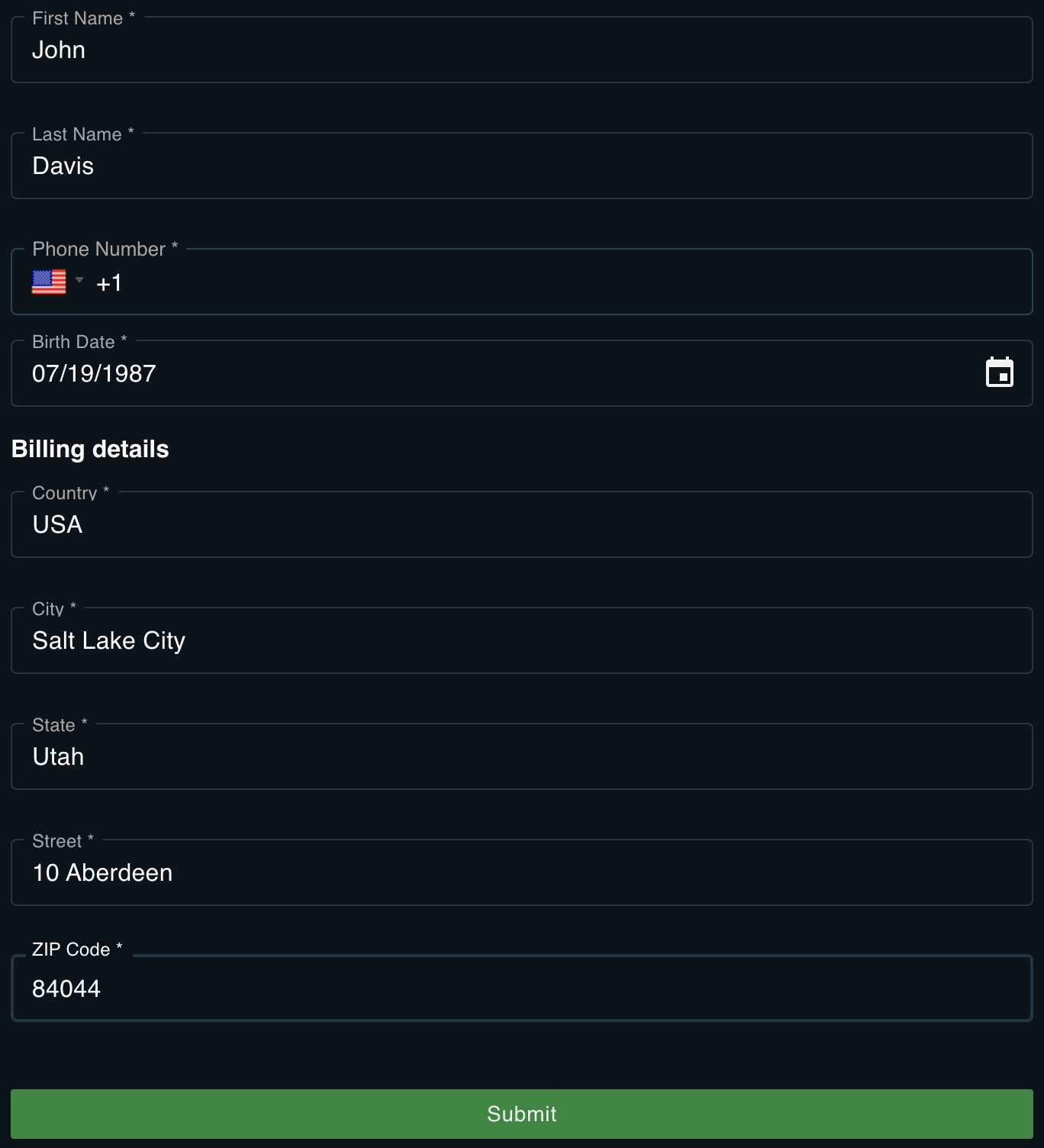
Enter your Personal Details
We collect some basic information from you including your name, birthday and billing details.
 At this point you are ready to trade on the Marketplace.
Purchasing on the Marketplace
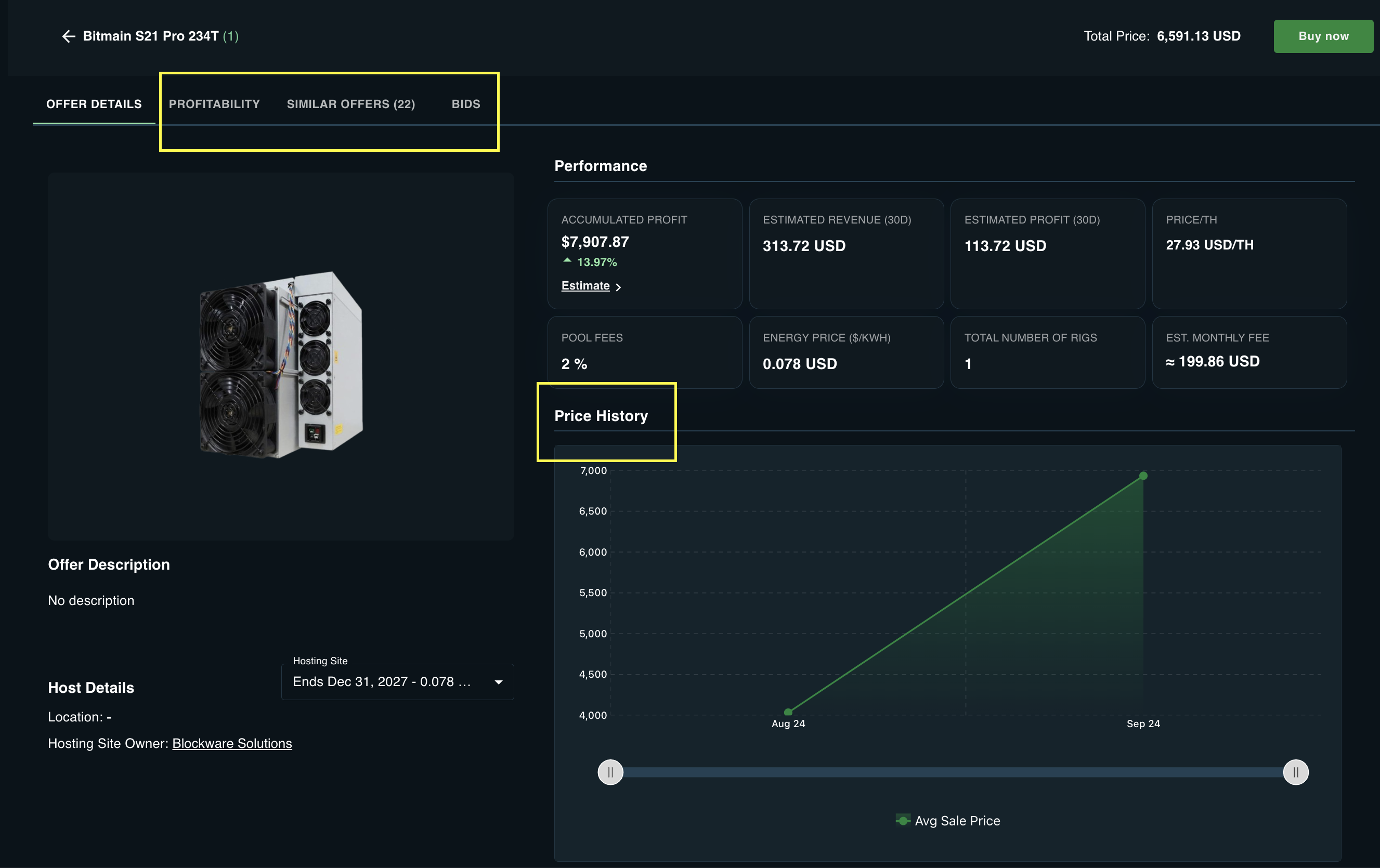
To purchase on the Marketplace you first select a Mining Rig, or a bundle of Mining Rigs, from the list of offers to see the Offer Details.
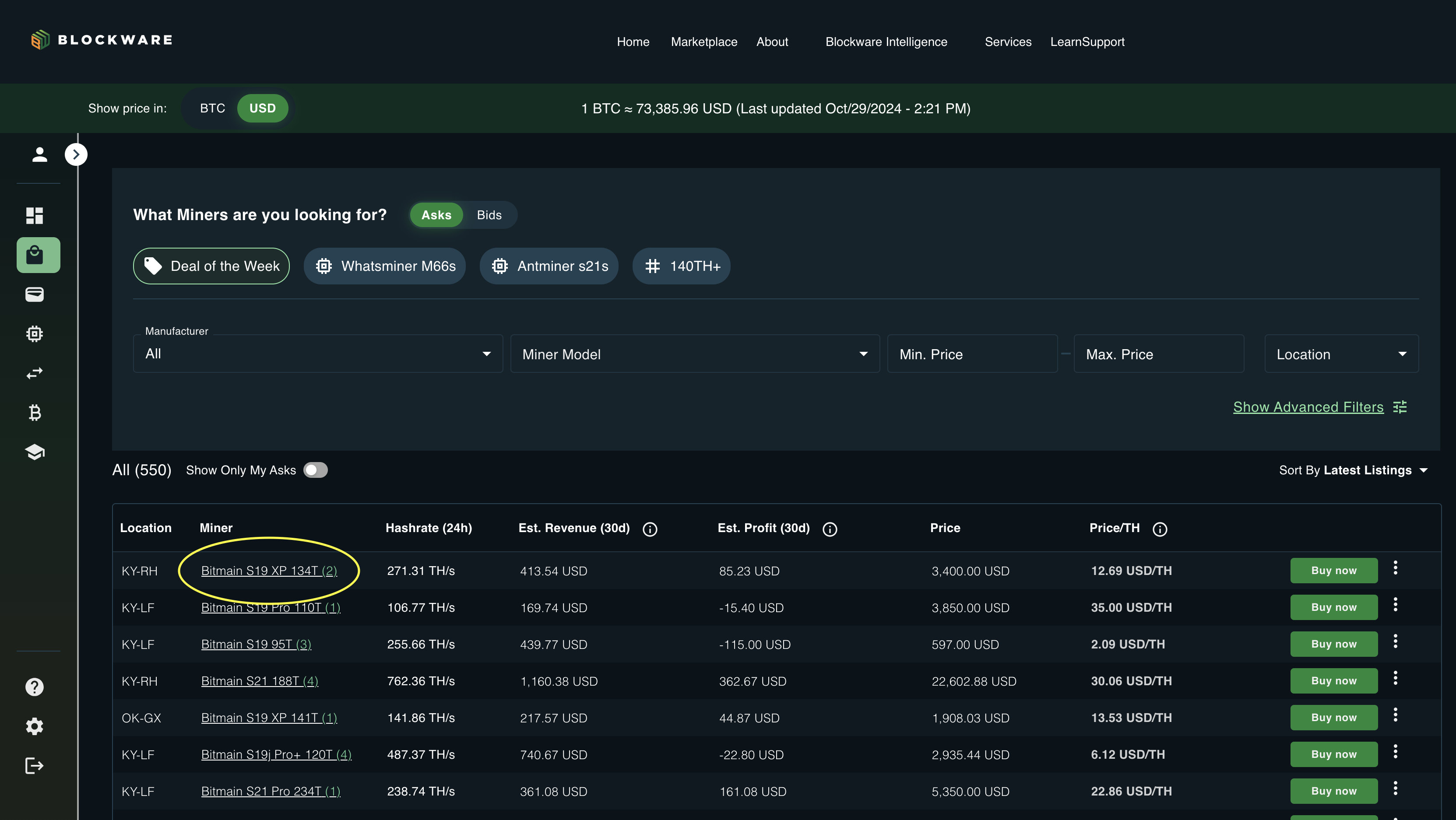
Offer Details
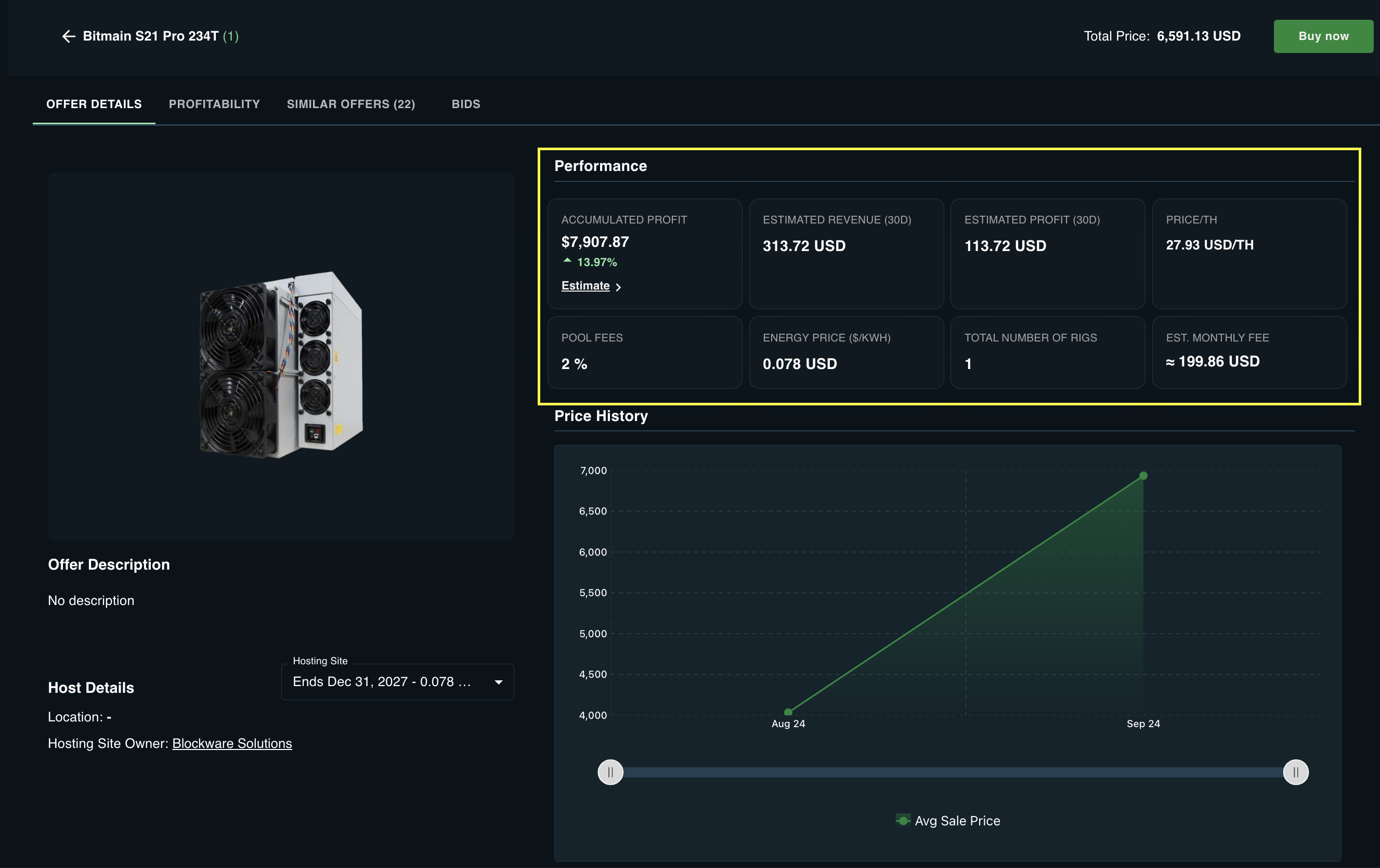
The Offer Details includes the estimated revenue and profit, hosting costs.
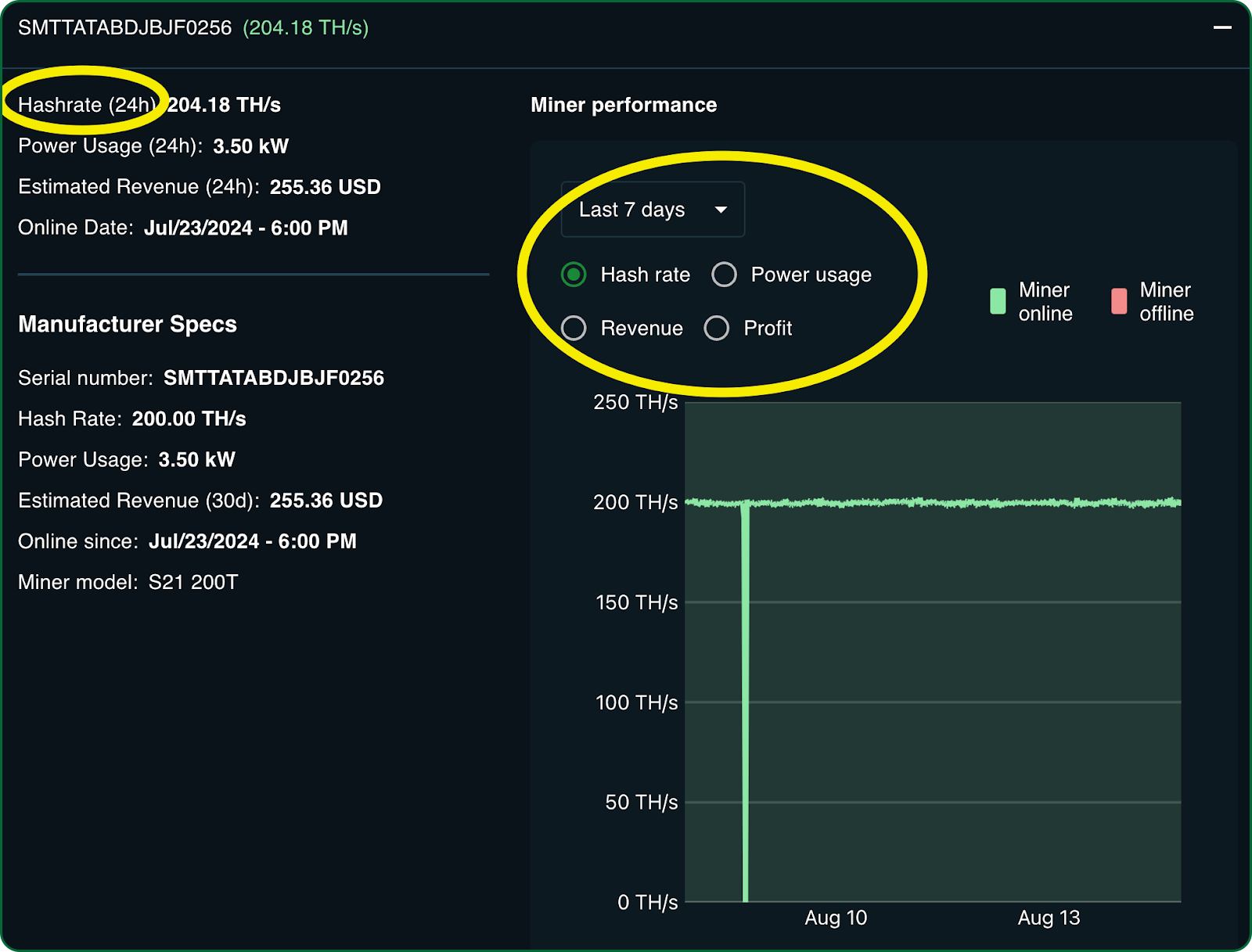
 You can also see historical hashrate actuals for the specific rig.
 You have options to use the Profitability Calculator and to see current Asks (other offers for that same rig model) and Bids (proposed prices from potential buyers). You can also see historical sales prices for that rig model over time.
Buy Now
When you have completed your research on the selected Mining Rig you select the Buy Now button which takes you to the Checkout Page.

Checkout Page
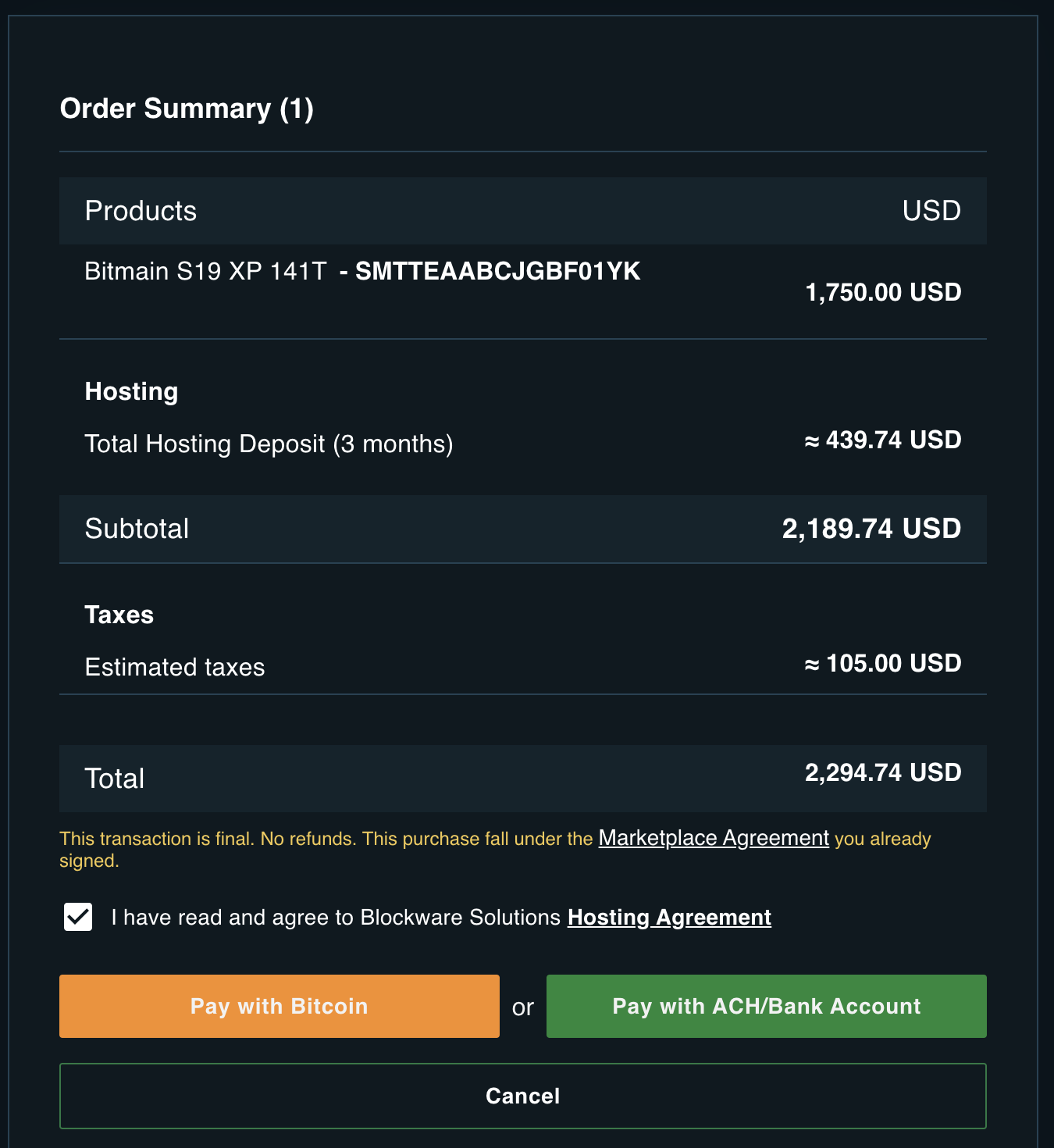
The Checkout Page provides details on the Product (Mining Rig) including its serial number, the Hosting Deposit, and Taxes.
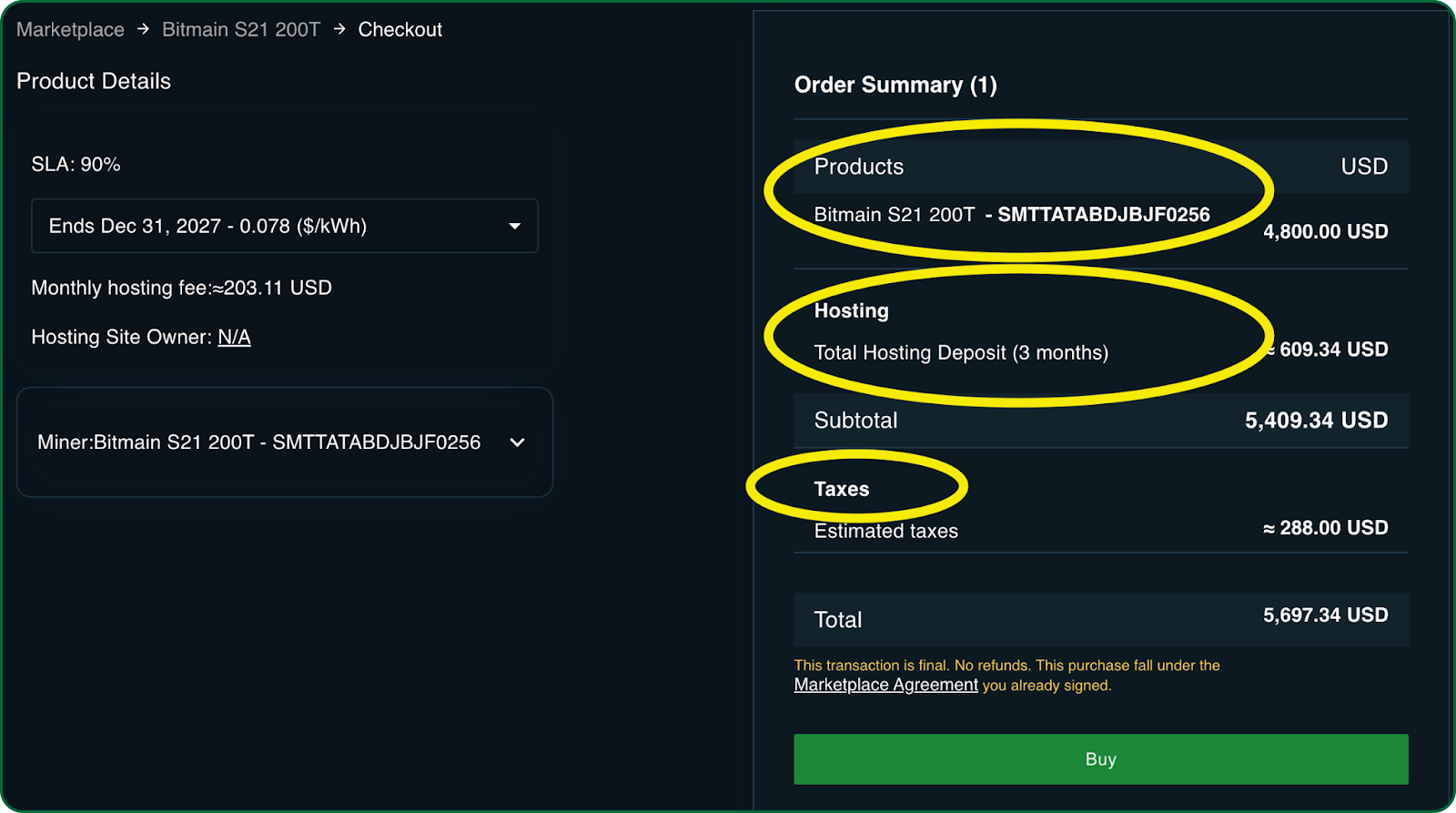
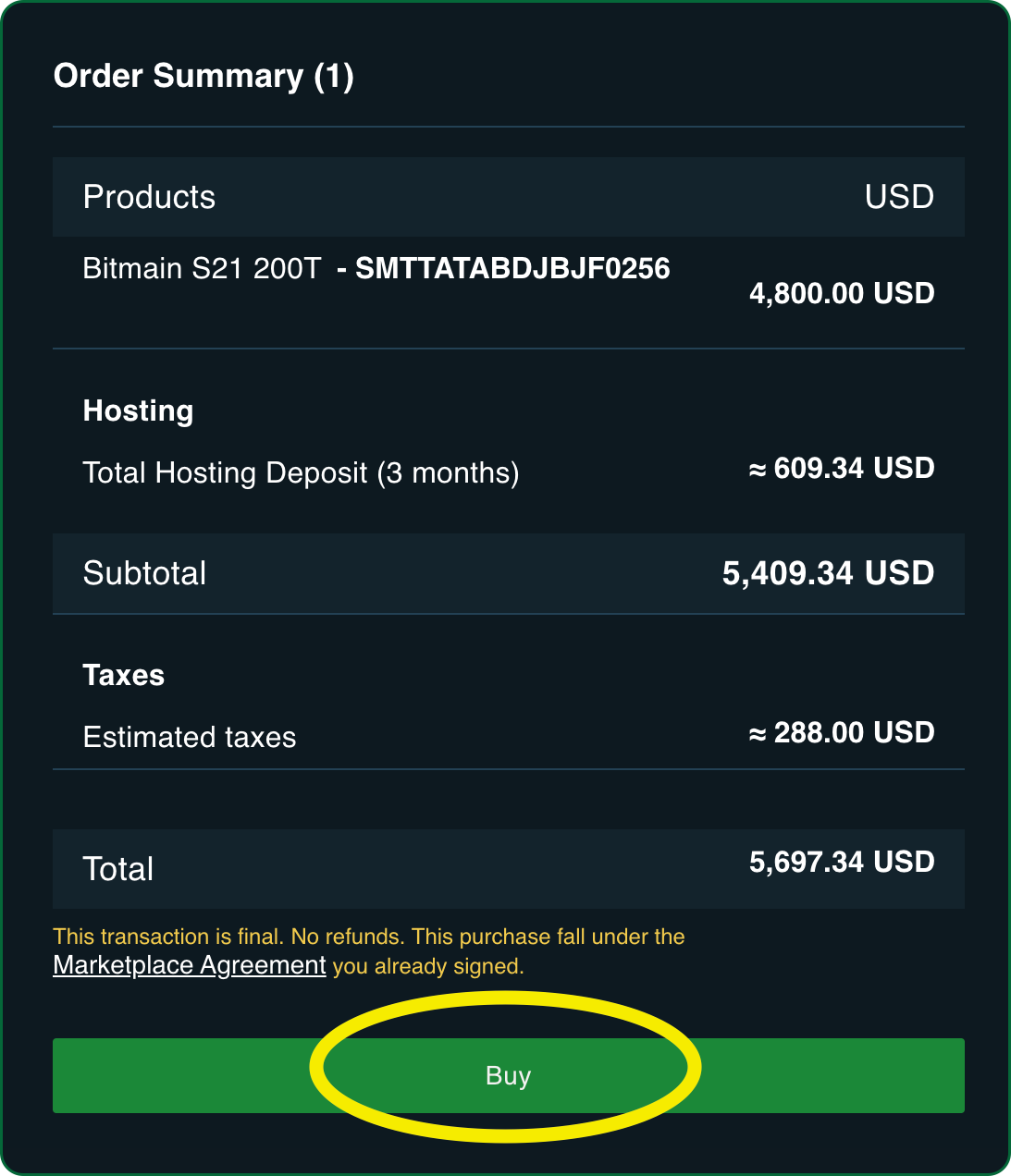
When you’re ready you select the Buy button which takes you to the Payment Page.
Accept the Hosting Agreement
When you purchase the mining rig from the seller you simultaneously enter into a Hosting Agreement with Blockware Solutions.
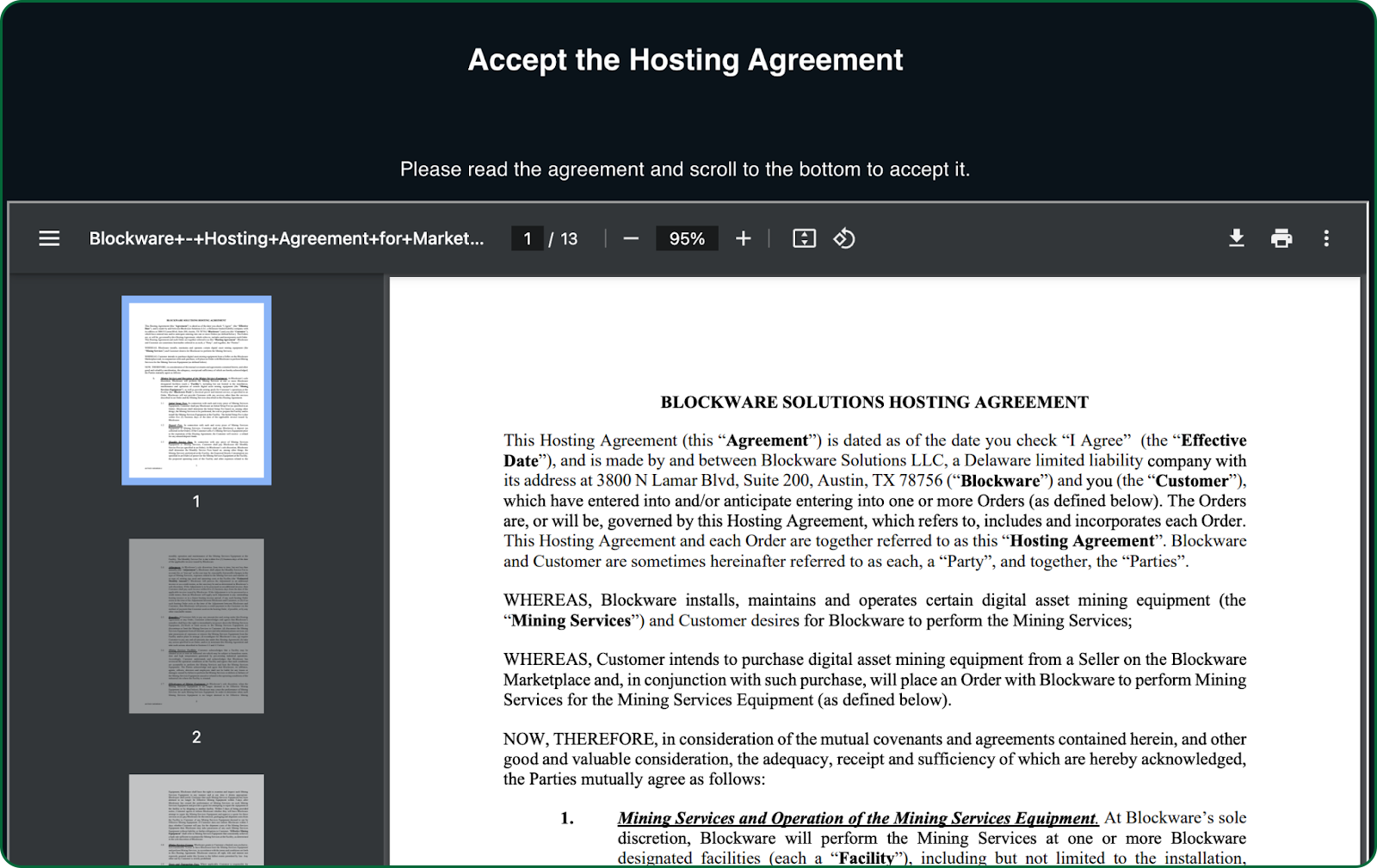
Review this agreement in full and when you reach the bottom you must check at you have read and accept this agreement.
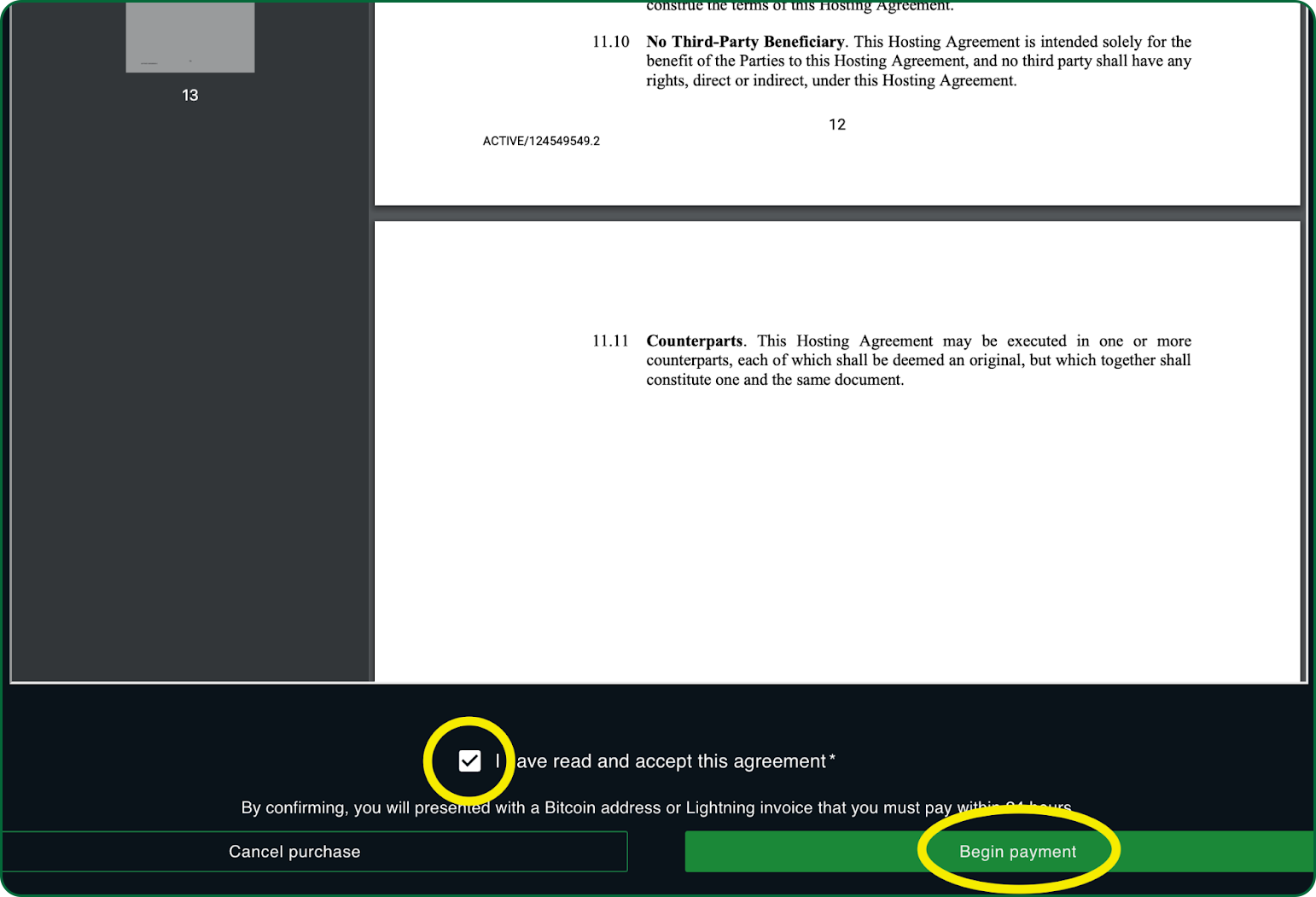
Then select the Begin payment button to proceed to payment.
Pay with Bitcoin
Marketplace transactions are paid with Bitcoin and are processed on the Bitcoin Network.
You are presented with a total amount from the Order Summary in the Checkout Page and you can either scan the barcode from your wallet app or copy the Total and Bitcoin address and paste them into your wallet.
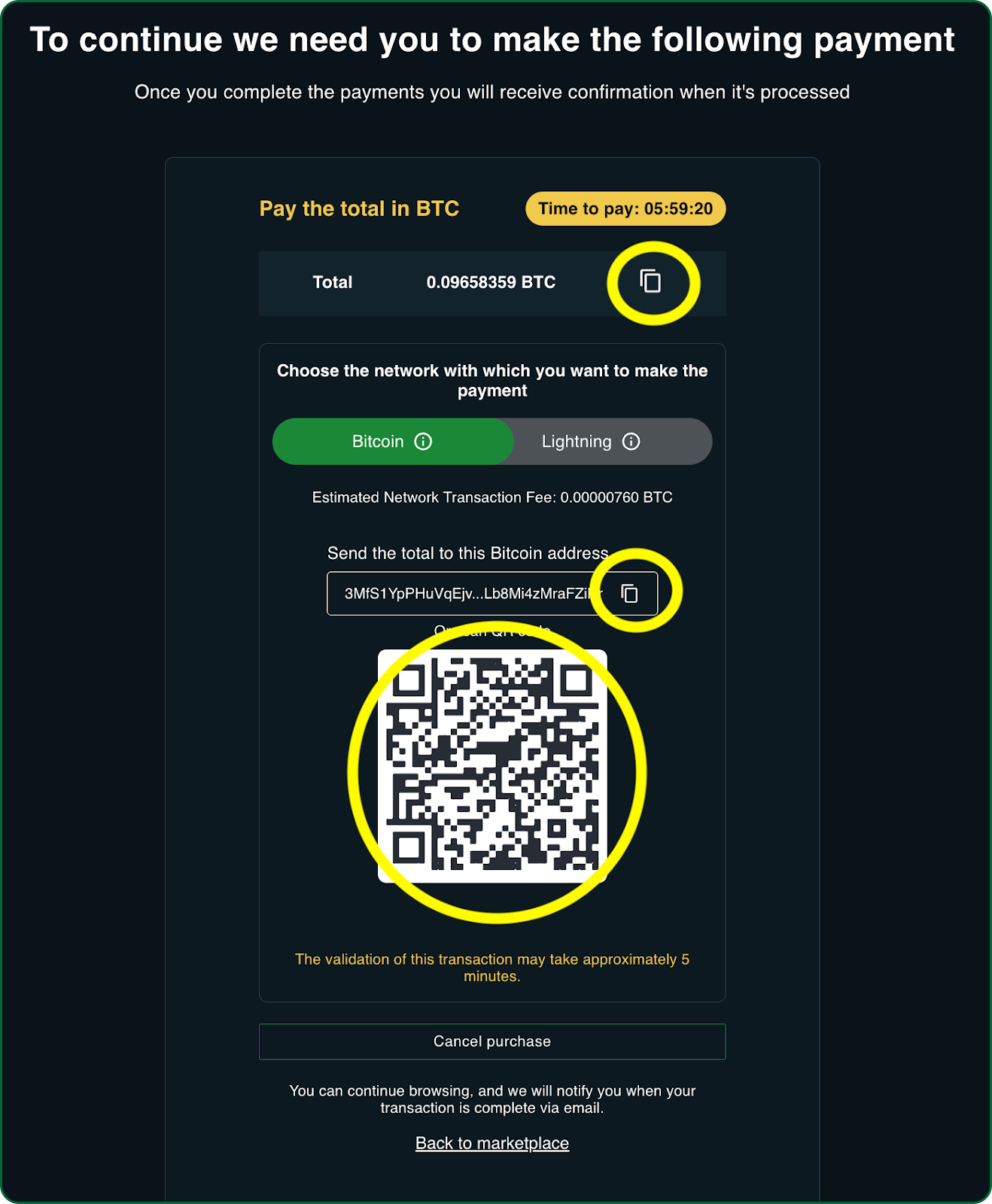
Once you send the Bitcoin it takes six on-chain confirmations before the transaction is complete. On-chain conformations occur when a Bitcoin block is mined and this takes place every 10 minutes on average. So you’ll be mining approximately within 1 hour of sending BTC to the Marketplace.
Tracking Payment Status
The Marketplace Transaction tab provides a history of all of your transactions including this one in progress. From here you can view the Invoice.

You can also see the transaction Status as the Bitcoin Network processes the transaction.
PendingPayment: Awaiting the initiation of payment by the buyer.
PaymentInProgress: The payment has been initiated and is currently being processed on the Bitcoin network.
PendingRemittance: Payment has been received and is awaiting transfer to the seller.
RemittanceInProgress: The transfer of funds to the seller is currently being processed.
Completed: The transaction has been fully processed and finalized on-chain.
Canceled: The transaction has been canceled by the buyer or system before completion.
Failed: The transaction was not successful due to an error or insufficient funds.
Confirmation Email and On-Chain
Once the Bitcoin Transaction is complete you now own the Mining Rig. You will receive an email with the Invoice and links to your Marketplace Miners page where you can see your Rig.

At the bottom of the email there’s a link to a block explorer so you can see exactly where in the Bitcoin Blockchain this transaction was recorded on-chain.
Fiat Payments with ACH / Bank Account
The Blockware Marketplace now offers an additional payment option, enabling customers to purchase mining rigs and services using ACH bank transfers alongside Bitcoin payments. This enhancement increases flexibility and accessibility for users who prefer transacting in fiat currency directly from their bank accounts.
Benefits and How It Works
With the ACH bank payment option, customers can securely transfer funds from their bank accounts, making the purchase process straightforward and convenient leveraging our partners Paynote and Plaid. This option allows for same day ACH, ensuring that buyers experience the same seamless and turn-key hashrate they expect with Bitcoin payments. To use ACH payments, customers will simply select the ACH option during checkout, follow the bank transfer instructions, and confirm the transaction. This new feature supports both new and existing users who verify (or have already verified) their identity with KYC , expanding their choices and making the Marketplace more accessible to a broader range of Bitcoiners.
ACH Payment Policy
Eligibility
ACH is available for offers up to $15,000.
Blockware can process a maximum of $40,000 in ACH transactions per day.
If ACH is unavailable for an offer, it may be due to one of these limits being exceeded.
Fee
Payments made via ACH will incur a 5% fiat fee.
Processing Time
ACH payments submitted after 4:00 PM EST will be processed on the next business day.
When do I start mining?
You start mining as soon as your Bitcoin transaction completes. Once that occurs you own the Mining Rig and it is automatically configured to send rewards to the Wallet you set up on your account.
You can see your Mining Rig in your Miners tab. It may take a few hours to show the Rig Performance information such as Hash Rate, Revenue and Profit.
Understanding Bitcoin Wallets
To purchase an ASIC on the Blockware Marketplace, you'll need Bitcoin (BTC) and a Bitcoin wallet. The wallet is necessary not only for making the purchase but also for receiving your mining rewards. You have the flexibility to use separate wallets for these different purposes if you prefer.
What is a Bitcoin Wallet?
A Bitcoin wallet is a digital tool that allows users to securely store, send, and receive Bitcoin. It functions as a unique address on the Bitcoin network, often represented by a string of alphanumeric characters, where Bitcoin can be deposited and withdrawn.
Each wallet is associated with a private key, which is necessary for authorizing transactions, ensuring that only the owner has control over the funds. Bitcoin wallets can be software-based or hardware devices, each offering varying levels of security and convenience.
Setting Up a Bitcoin Wallet
Before acquiring Bitcoin, you’ll need a Bitcoin wallet to store and manage your BTC. A Bitcoin wallet is a digital tool that allows you to send, receive, and store Bitcoin securely. The simplest way to get started is by using a wallet provided by a Bitcoin exchange.
Acquiring Bitcoin (BTC)
Once you have a wallet, you can acquire BTC. The easiest way to obtain Bitcoin is by signing up for a Bitcoin exchange. Depending on your location, you have several options such as Coinbase, CashApp, Swan, River, Strike, or Relai. These platforms allow you to buy, sell, send, and receive Bitcoin with ease.
You can also purchase BTC from the Marketplace with multiple options to fund the purchase depending on your location and the amount. These include credit card, Apple Pay, Google Pay and Bank transfer.
The Four Tiers of Bitcoin Wallets: Balancing Convenience and Security
There are four main "tiers" of Bitcoin wallets, each offering a different balance between convenience and security. Let's break them down so you can decide which is the best fit for your needs.
1. Custodial Wallet (with an Exchange)
This is the simplest way to start using Bitcoin. By creating an account with exchanges like Coinbase, Strike, or CashApp, you’re given access to a Bitcoin "wallet." However, this wallet is custodial, meaning the exchange controls it — not you. This is convenient because you don’t have to manage your private keys, allowing you to start sending and receiving Bitcoin with ease. The downside is that you’re not truly in control of your Bitcoin. One of Bitcoin's core value propositions is eliminating the need for trusted third parties, and by using a custodial wallet, you’re sacrificing that independence for convenience.
For beginners, starting with a custodial exchange wallet is perfectly acceptable. As you become more familiar with Bitcoin and its security features, you can consider transitioning to self-custody solutions to better protect your investments.
2. Hot Wallet
A step up from custodial wallets, a hot wallet is software you can install on your mobile device, laptop, or desktop. Examples include BlueWallet, Phoenix Wallet, Mutiny Wallet, Aqua, and Envoy. In this case, you control the private keys—usually stored as a 12- or 24-word phrase—so you’re no longer reliant on an exchange. Hot wallets are a solid middle ground: you maintain control over your Bitcoin, but because the private key is stored on a device connected to the internet, it remains vulnerable to hacking.
3. Cold Wallet
Also known as a hardware wallet, a cold wallet is a physical device that generates and stores your private keys offline, disconnected from the internet. This offline nature significantly reduces the risk of hacking, making cold wallets a safer option for long-term storage. However, this added security comes at the cost of convenience—sending Bitcoin requires the extra step of connecting the device to a computer or phone. Receiving Bitcoin, on the other hand, is still just as simple as with a hot wallet or custodial wallet; you only need to share your public address.
Most Bitcoin users employ a combination of wallets: a hot or custodial wallet for everyday transactions and a cold wallet for secure, long-term storage. Think of it as the difference between a checking account and a savings account.
4. Multi-Signature (MultiSig) Wallet
A MultiSig wallet adds another layer of security and is primarily used by institutions or individuals seeking advanced protection. It requires multiple private keys to authorize a transaction — common setups include "2-of-3" or "3-of-5" schemes. In a 2-of-3 setup, for example, the wallet has three private keys, and any two of them are required to move funds.
MultiSig wallets are particularly useful for organizations to prevent any one person from having full control over the Bitcoin, and they can also enhance security for individual users looking to protect large amounts of Bitcoin.
Conclusion
We’ve covered the essentials of purchasing and setting up your Bitcoin mining rig on the Blockware Marketplace. You now understand that buying an ASIC means investing in a highly specialized piece of equipment that will be hosted and managed in a professional data center. We also discussed the flexibility of the hosting contract, the steps to create your Marketplace account, and how to set up your Bitcoin wallet for receiving mining rewards. With this knowledge, you’re prepared to make an informed purchase, complete your transaction, and start mining Bitcoin efficiently and effectively.
Questions to Gauge Understanding:
What are you acquiring when you purchase an ASIC through the Blockware Marketplace?
How does the hosting contract work, and why is it important for managing operational costs?
What flexibility does the Blockware hosting contract offer regarding selling your ASIC?
What steps are required to set up your account on the Blockware Marketplace before purchasing?
How do you set up a Bitcoin wallet, and why is it necessary for receiving mining rewards?
What payment methods are available for purchasing an ASIC on the Marketplace?
What security benefits does self-custody offer compared to using an exchange wallet?
What happens after you complete the Bitcoin transaction for purchasing your mining rig?